KeyLime Interactive x Purdue UX

Key Lime Interactive (KLI) is a user experience (UX) and customer experience (CX) service design company that aids clients across multiple industries. KLI aims to expand its industry knowledge into the transportation and public services sector by evaluating the experience of on and off-campus Purdue students using the City Bus service. In this project, I worked in a team of nine to complete the task of improving ridership and experiences using CityBus.

Company

Company

KeyLime Interactive

Date

Date

Jan 2024 - May 2024

Collaborators

Collaborators

Amy Fei, Anderson Tsan, Emaline Frey, Jack Myers, Joy Zhang, Kaylee Young, Linh Pham, Mikeala Thompson

Amy Fei, Anderson Tsan, Emaline Frey,
Jack Myers, Joy Zhang, Kaylee Young,
Linh Pham, Mikeala Thompson

My Contributions

My Contributions

Documentation, Contextual Inquiry, Observations, Secondary Research, Guerilla Testing

Documentation, Contextual Inquiry,
Observations, Secondary Research,
Guerilla Testing

User Group

User Group

Purdue students who use the CityBus

Project Goals

CityBus is Purdue’s primary student transportation, but users face frustration across various touchpoints. Through user research, we identified key pain points and focused on iterative redesigns to enhance the overall experience.

Results

We found the most opportunity for design in the MyCityBus app and decided to create both a current app redesign and a complete app overhaul.

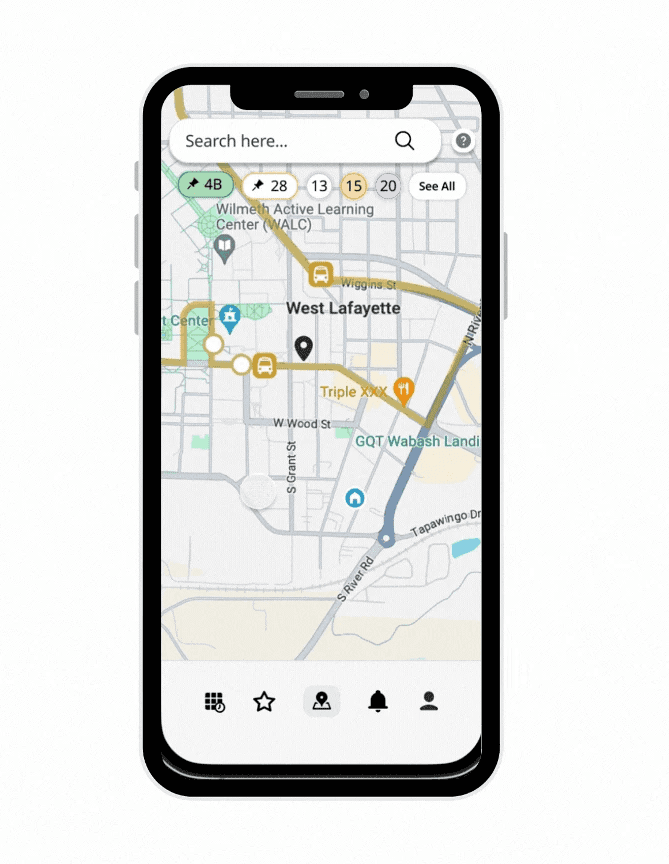
In our complete app overhaul, we explored new user flows, UIs, and features to enhance the app experience and give it a more modern aesthetic. Key updates included a map-centric user flow, a Google and Apple Maps-inspired UI, and a home screen widget to help users track bus times and trip progress without opening the app.

For the current app redesign, we focused on small yet meaningful changes to improve the app's appearance and flow. These updates featured push notifications to reduce user reliance on the app, alerts for early or late buses, and overall enhancements to make the app more intuitive and navigable for new users.

Usability Testing

Usability Testing

We used contextual inquiry to observe how users interacted with the bus system in real-life settings, uncovering key pain points. Guerrilla testing allowed us to gather quick, iterative feedback, helping us refine our approach efficiently. Together, these methods provided a well-rounded understanding of user needs and behaviors.

Observations & Research

Observations & Research

Our research, including app reviews and Reddit discussions, uncovered key insights into the bus rider experience and service issues. This informed a comprehensive journey map, shaping our understanding of the student experience throughout the project.
Research Results

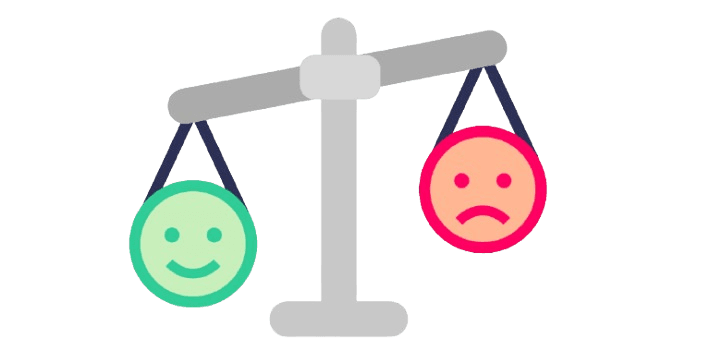
Pleasure Points:

  • Live tracking improves accuracy

  • Routes and stops are being upgraded

Pain Points:

  • App glitches → the bus icon on live tracking disappears

  • Inaccurate bus times

  • Early service cutoff (6pm)

Contextual Inquiry

Objective: Understand the student rider experience and identify pain points.

Method: Shadowed Purdue students on various CityBus routes, using think-aloud protocols and follow-up questions.

Key Findings:

  • Lack of SignageNo arrival times or clear info, confusing new riders.

  • Cramped SheltersFew, small shelters; riders wait in bad weather.

  • Over-reliance on AppNo physical indicators; app is the only reliable source.

  • LCD Display IssuesHard to see from the back; needs better cues.

  • Stop Request CordRiders unaware they need to pull it.

  • Inconsistent PA SystemSome too quiet or unclear; needs standardization.


Contextual Inquiry

Objective: Understand the student rider experience and identify pain points.

Method: Shadowed Purdue students on various CityBus routes, using think-aloud protocols and follow-up questions.

Key Findings:

  • Lack of SignageNo arrival times or clear info, confusing new riders.

  • Cramped SheltersFew, small shelters; riders wait in bad weather.

  • Over-reliance on AppNo physical indicators; app is the only reliable source.

  • LCD Display IssuesHard to see from the back; needs better cues.

  • Stop Request CordRiders unaware they need to pull it.

  • Inconsistent PA SystemSome too quiet or unclear; needs standardization.


Guerilla Testing

Objective: Allowed us to quickly gather feedback from Purdue’s large pool of CityBus users.

Method:

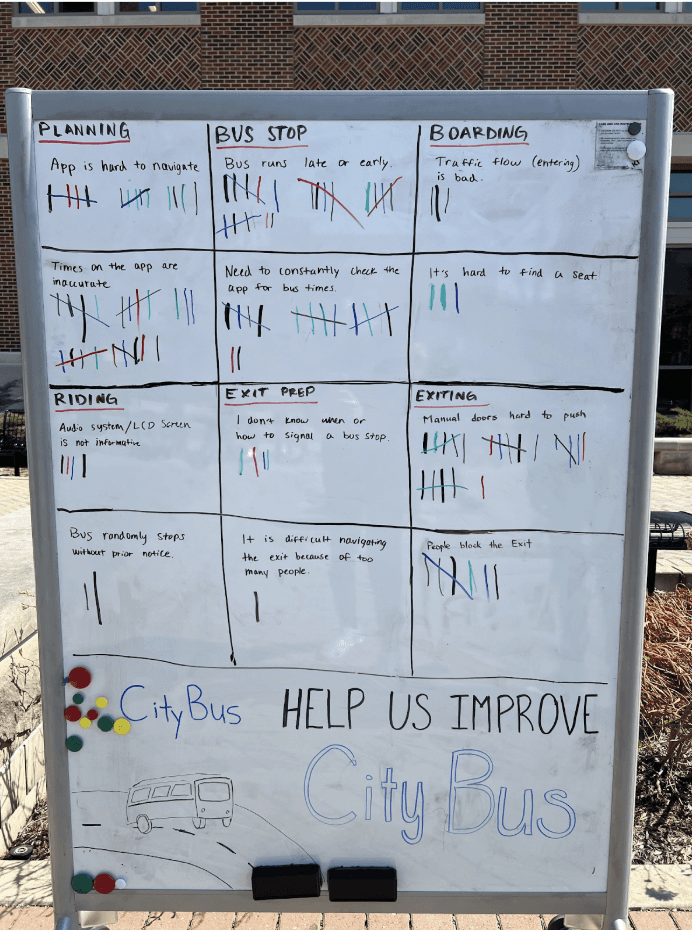
  • Actual Testing: Conducted in a high-traffic campus area, refining the method to use tally marks and brief interviews for deeper insights.

  • Pilot Study: Tested with UX students using a FigJam board to map frustrations across seven bus ride steps..

Key Findings:

  • Biggest issues: bus timing (early/late), difficulty with manual doors, and frustrations with the MyCityBus app.

  • App issues: frequent checking required, poor navigation, and inaccurate bus times.

Guerilla Testing

Objective: Allowed us to quickly gather feedback from Purdue’s large pool of CityBus users.

Method:

  • Actual Testing: Conducted in a high-traffic campus area, refining the method to use tally marks and brief interviews for deeper insights.

  • Pilot Study: Tested with UX students using a FigJam board to map frustrations across seven bus ride steps..

Key Findings:

  • Biggest issues: bus timing (early/late), difficulty with manual doors, and frustrations with the MyCityBus app.

  • App issues: frequent checking required, poor navigation, and inaccurate bus times.

Finalizing Pain Points

After completing usability testing, we were able to narrow down what pain points we wanted to focus on.


Issues to be Fixed in the Original App

Reduce users’ over-reliance on the MyCityBus app.

Users have to rely on the app for navigation and understanding of the bus service. Reducing reliance on the app would allow for a more seamless, easy-to-use service as riders wouldn't have to constantly check their mobile devices.

Poor time communication

Bus times are not accurately and/or clearly communicated. 


Bad in-app navigation

There is a lack of backtracking in the app.

There is confusion on why one screen leads to another, or how to get to a certain screen.


Issues to be Fixed in the Original App

Reduce users’ over-reliance on the MyCityBus app.

Users have to rely on the app for navigation and understanding of the bus service. Reducing reliance on the app would allow for a more seamless, easy-to-use service as riders wouldn't have to constantly check their mobile devices.

Poor time communication

Bus times are not accurately and/or clearly communicated. 


Bad in-app navigation

There is a lack of backtracking in the app.

There is confusion on why one screen leads to another, or how to get to a certain screen.

Sketching

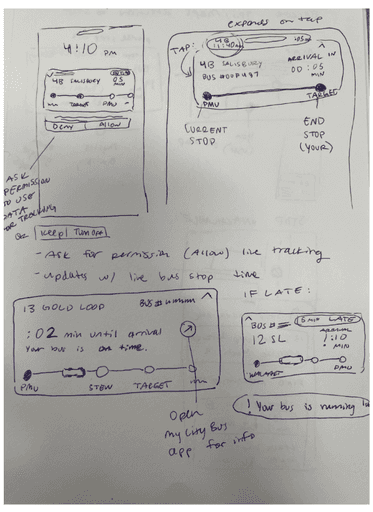
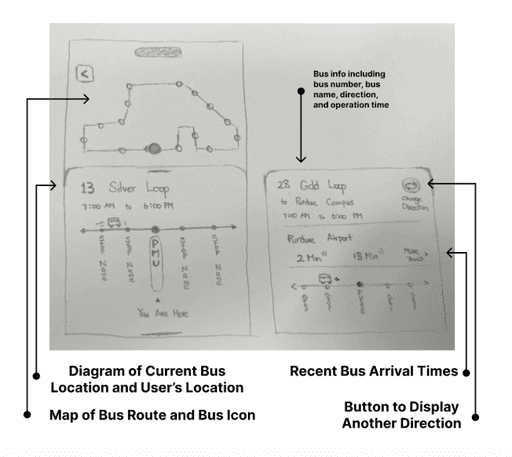
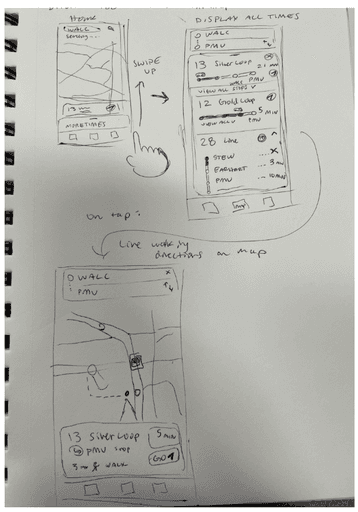
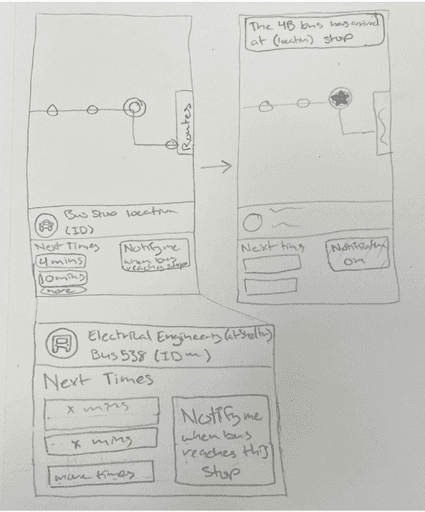
For the first opportunity, we aimed to resolve the pain point of heavy reliance on the MyCityBus app to use the service through two solutions.
Research Results

Pleasure Points:

  • Live tracking improves accuracy

  • Routes and stops are being upgraded

Pain Points:

  • App glitches → the bus icon on live tracking disappears

  • Inaccurate bus times

  • Early service cutoff (6pm)

Research Results

Pleasure Points:

  • Live tracking improves accuracy

  • Routes and stops are being upgraded

Pain Points:

  • App glitches → the bus icon on live tracking disappears

  • Inaccurate bus times

  • Early service cutoff (6pm)


Live GPS directions along with a map view

The first solution features live GPS directions along with a map view so that users are more aware of where they need to go to get to their correct bus stop. The directions would work similarly to Google or Apple maps by providing real-time walking directions according to a tracking icon along a map.


Live GPS directions along with a map view

The first solution features live GPS directions along with a map view so that users are more aware of where they need to go to get to their correct bus stop. The directions would work similarly to Google or Apple maps by providing real-time walking directions according to a tracking icon along a map.


Live GPS directions along with a map view

The first solution features live GPS directions along with a map view so that users are more aware of where they need to go to get to their correct bus stop. The directions would work similarly to Google or Apple maps by providing real-time walking directions according to a tracking icon along a map.


Map with notification options

The second solution displays a similar map with notification options, in which users can choose to receive alerts when the bus is at a specific time or distance away from their stop. This would resolve the issue of constantly checking the app since automated alerts would notify users without needing to reopen the app and further drain their phone battery.


Map with notification options

The second solution displays a similar map with notification options, in which users can choose to receive alerts when the bus is at a specific time or distance away from their stop. This would resolve the issue of constantly checking the app since automated alerts would notify users without needing to reopen the app and further drain their phone battery.


Map with notification options

The second solution displays a similar map with notification options, in which users can choose to receive alerts when the bus is at a specific time or distance away from their stop. This would resolve the issue of constantly checking the app since automated alerts would notify users without needing to reopen the app and further drain their phone battery.


Live notification widget

The notification widget would appear on the user's lock screens and automatically refresh with incoming geolocation data. Riders can also receive an estimated arrival time for when the bus will come to their stop as well as alerts if the bus is delayed or out of service, all without opening the app.


Live notification widget

The notification widget would appear on the user's lock screens and automatically refresh with incoming geolocation data. Riders can also receive an estimated arrival time for when the bus will come to their stop as well as alerts if the bus is delayed or out of service, all without opening the app.


Live notification widget

The notification widget would appear on the user's lock screens and automatically refresh with incoming geolocation data. Riders can also receive an estimated arrival time for when the bus will come to their stop as well as alerts if the bus is delayed or out of service, all without opening the app.


Live Bus Notifications


Users can receive live notifications with a visual indicator representing the bus as it moves along the route along with haptic vibrations as the bus arrives at each stop. That way, users can quickly glance at the widget on their phone and get a clear idea of where the bus is compared to their current location.


Live Bus Notifications


Users can receive live notifications with a visual indicator representing the bus as it moves along the route along with haptic vibrations as the bus arrives at each stop. That way, users can quickly glance at the widget on their phone and get a clear idea of where the bus is compared to their current location.


Live Bus Notifications


Users can receive live notifications with a visual indicator representing the bus as it moves along the route along with haptic vibrations as the bus arrives at each stop. That way, users can quickly glance at the widget on their phone and get a clear idea of where the bus is compared to their current location.

Improvements

Our team debated between a full app redesign or smaller, more feasible improvements. We decided to explore both approaches, splitting into two teams—one focused on refining the existing app and the other on a more creative overhaul. I worked on the team that reimagined the app with an innovative redesign, exploring new ways to address key user pain points and enhance the overall experience.

Current App vs Our New Designed App

Research Results

Pleasure Points:

  • Live tracking improves accuracy

  • Routes and stops are being upgraded

Pain Points:

  • App glitches → the bus icon on live tracking disappears

  • Inaccurate bus times

  • Early service cutoff (6pm)

“ With our new visual branding and language in place, the new Shopify brand clearly captures the essence of our current and target customer base, our employees, and our values. ”

Tobias Lütke

CEO, Co-founder | Shopify

Reflection

Overall, I loved working on this project!


Issues to be Fixed in the Original App

Reduce users’ over-reliance on the MyCityBus app.

Users have to rely on the app for navigation and understanding of the bus service. Reducing reliance on the app would allow for a more seamless, easy-to-use service as riders wouldn't have to constantly check their mobile devices.

Poor time communication

Bus times are not accurately and/or clearly communicated. 


Bad in-app navigation

There is a lack of backtracking in the app.

There is confusion on why one screen leads to another, or how to get to a certain screen.

Sahana Bala's Portfolio

Sahana Bala's Portfolio

Sahana Bala's Portfolio

Create a free website with Framer, the website builder loved by startups, designers and agencies.