
Microsoft x Purdue UX
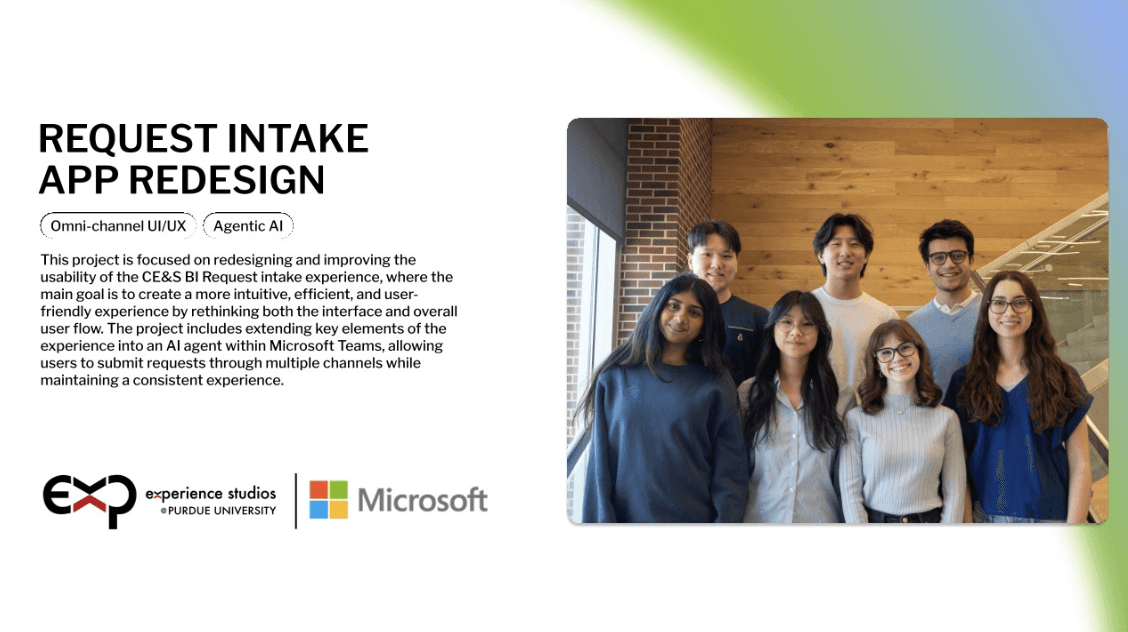
Customer Experience & Success Business Intelligence (CE&S BI) is a team within Microsoft, a multinational technology solutions company. This team is responsible for providing a single platform which takes complex data and unifies it into a secure and governed source of truth. Their Unified Data Platform (UDP) acts as a central hub for the datasheets of over 20k clients. In addition to storing all this data, CE&S BI also uses metrics, automation, and AI to provide additional analytic tools.
Company
Company
Microsoft CE&S BI
Date
Date
Jan 2026 - May 2026
Collaborators
Collaborators
Ava Biegel, Katie Chen, Emily Clark, Hammad Javaid, Jun Hyok Lim, Ashton Sun
Izza Barbar, Saathvika Talluri,
Stella Lim, David Levine, Jean Chou
My Contributions
UX Research, Enterprise UX Design, Usability Testing, Prototyping
Usability Testing, Flowchart Mapping,
Low-Fidelity Prototypes,
High-Fidelity Prototypes, Documentation
User Group
Internal Microsoft Employees
Individuals in California
seeking self-help legal services
Problem Space
Microsoft’s CE&S BI request intake experience was difficult for employees to navigate due to technical terminology, unclear workflows, and limited visibility after submission. Users often struggled to understand form requirements, track request progress, and confidently submit requests independently, leading to confusion, inefficiencies, and increased reliance on support teams.
Microsoft’s CE&S BI request intake experience was difficult for employees to navigate due to technical terminology, unclear workflows, and limited visibility after submission. Users often struggled to understand form requirements, track request progress, and confidently submit requests independently, leading to confusion, inefficiencies, and increased reliance on support teams.
Results
The redesigned experience streamlined the request intake workflow through simplified multi-step forms, clearer feedback systems, and improved request tracking visibility. By restructuring complex workflows, reducing cognitive load, and introducing intuitive dashboard and confirmation experiences, the final solution created a more transparent and user-friendly enterprise request management system.
Research & Insights
Research & Insights
To better understand usability challenges within Microsoft’s CE&S BI request intake experience, our team researched enterprise workflows, form design, and request management systems. Since we were provided documentation rather than direct platform access, our process focused on analyzing workflow pain points and validating design decisions through iterative prototyping and usability testing.
To better understand usability challenges within Microsoft’s CE&S BI request intake experience, our team researched enterprise workflows, form design, and request management systems. Since we were provided documentation rather than direct platform access, our process focused on analyzing workflow pain points and validating design decisions through iterative prototyping and usability testing.
Literature Review
Researched best practices surrounding form design, cognitive load, and enterprise workflows to better understand how users interact with complex request management systems.
Heuristic Evaluation
Analyzed sponsor-provided documentation to identify usability breakdowns involving technical terminology, inconsistent layouts, and dense information structures.
Competitive Analysis
Analyzed enterprise platforms such as Jira, Zendesk, Salesforce, and Trello to identify patterns in request tracking, dashboard visibility, and workflow organization.
Our research revealed three recurring opportunities:
clearer request tracking
stronger feedback visibility
simplified workflow structures
These insights directly guided later dashboard, form, and confirmation flow decisions.
Our research revealed three recurring opportunities:
clearer request tracking
stronger feedback visibility
simplified workflow structures
These insights directly guided later dashboard, form, and confirmation flow decisions.
Sketching & Whiteboarding
Sketching & Whiteboarding
Using insights gathered during research, our team independently explored concepts for intake workflows, form structures, and request tracking systems before presenting and discussing our ideas during collaborative sketching and whiteboarding sessions. Through these conversations, we identified recurring workflow patterns and aligned on approaches focused on improving clarity, workflow visibility, and reducing cognitive load.
Using insights gathered during research, our team independently explored concepts for intake workflows, form structures, and request tracking systems before presenting and discussing our ideas during collaborative sketching and whiteboarding sessions. Through these conversations, we identified recurring workflow patterns and aligned on approaches focused on improving clarity, workflow visibility, and reducing cognitive load.

Collaborative whiteboarding session focused on restructuring enterprise intake workflows and identifying opportunities to improve clarity and workflow organization.
Collaborative whiteboarding session focused on restructuring enterprise intake workflows and identifying opportunities to improve clarity and workflow organization.
Early sketches focused on restructuring the intake process into a more guided and intuitive workflow. We explored concepts involving multi-step forms, dashboard-integrated request creation, progressive disclosure, and clearer request categorization to help users navigate complex workflows more confidently.
Early sketches focused on restructuring the intake process into a more guided and intuitive workflow. We explored concepts involving multi-step forms, dashboard-integrated request creation, progressive disclosure, and clearer request categorization to help users navigate complex workflows more confidently.
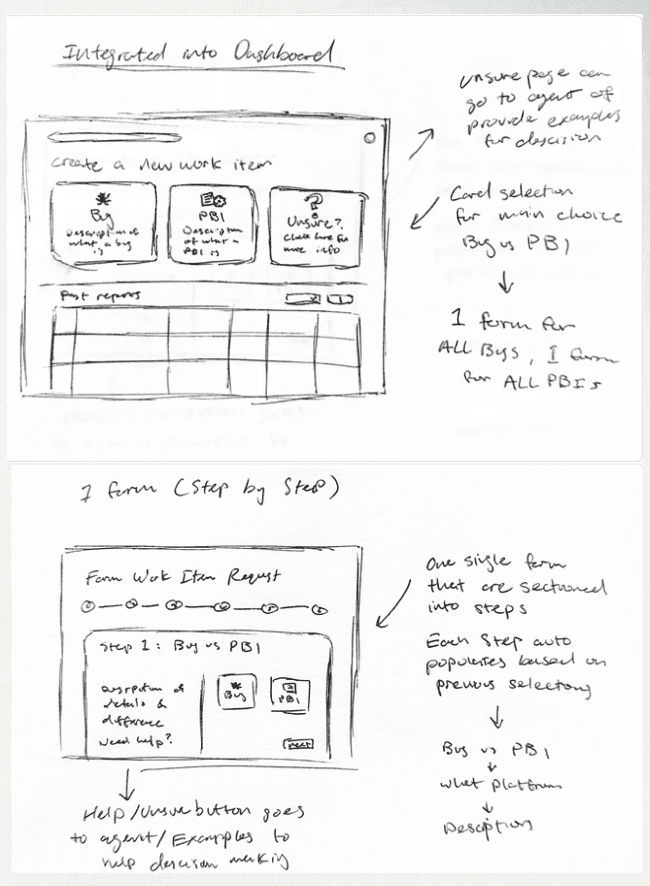
Intake Flow Exploration
Key Ideas Explored
multi-step intake workflows
dashboard-integrated request creation
simplified request categorization
clearer workflow guidance
progressive disclosure
Early intake flow concepts exploring dashboard-integrated request creation, multi-step workflows, and guided request submission patterns.
During collaborative whiteboarding sessions, our team focused on reorganizing related fields, identifying unfamiliar terminology, and prioritizing important information within the request workflow. This process helped simplify dense information structures and establish clearer hierarchy before transitioning into interactive prototypes.
During collaborative whiteboarding sessions, our team focused on reorganizing related fields, identifying unfamiliar terminology, and prioritizing important information within the request workflow. This process helped simplify dense information structures and establish clearer hierarchy before transitioning into interactive prototypes.
AI-Assisted Interactive Prototyping
AI-Assisted Interactive Prototyping
To rapidly validate workflow and interaction concepts, our team used Figma Make to transform early sketches into interactive AI-assisted prototypes. This allowed us to quickly test layouts, navigation patterns, and request tracking workflows before investing time into high-fidelity design.
To rapidly validate workflow and interaction concepts, our team used Figma Make to transform early sketches into interactive AI-assisted prototypes. This allowed us to quickly test layouts, navigation patterns, and request tracking workflows before investing time into high-fidelity design.

Interactive prototype withheld due to NDA and confidentiality restrictions surrounding internal Microsoft workflows and terminology.
Interactive prototype withheld due to NDA and confidentiality restrictions surrounding internal Microsoft workflows and terminology.
Usability Testing & Iteration
Usability Testing & Iteration
We tested our AI-assisted prototype with Microsoft employees and students to evaluate workflow clarity, request visibility, and form usability. Participants interacted with features such as request tracking dashboards, multi-step intake workflows, and structured request categorization.
We tested our AI-assisted prototype with Microsoft employees and students to evaluate workflow clarity, request visibility, and form usability. Participants interacted with features such as request tracking dashboards, multi-step intake workflows, and structured request categorization.
We asked both students and the Microsoft employee to act as requesters and walk through three tasks using the prototype:
Submit a new request
Track the request
Edit the request
Testing revealed that users responded positively to clearer workflow organization and request visibility, while also identifying opportunities to improve error feedback, title formatting, and form guidance.

Usability testing findings highlighting successful workflow interactions alongside areas requiring additional feedback visibility and guidance.
Final Designs
Final Designs
Following multiple rounds of research, ideation, prototyping, and usability testing, our final redesign focused on simplifying request workflows, improving visibility, and reducing friction throughout the intake experience.
Following multiple rounds of research, ideation, prototyping, and usability testing, our final redesign focused on simplifying request workflows, improving visibility, and reducing friction throughout the intake experience.
Request Submission Workflow
Request Submission Workflow
The redesigned intake workflow transformed dense, text-heavy forms into a more structured multi-step experience. Progressive disclosure and clearer hierarchy helped reduce overwhelming information density while guiding users through the request process more intuitively.
The redesigned intake workflow transformed dense, text-heavy forms into a more structured multi-step experience. Progressive disclosure and clearer hierarchy helped reduce overwhelming information density while guiding users through the request process more intuitively.

Redesigned multi-step intake workflow introducing clearer hierarchy, guided progression, and simplified request submission.
Request Tracking & Visibility
Request Tracking & Visibility
To improve transparency after submission, the redesigned dashboard introduced clearer request tracking, visible status indicators, and editable request management flows. These additions helped users independently monitor requests and better understand workflow progress.
To improve transparency after submission, the redesigned dashboard introduced clearer request tracking, visible status indicators, and editable request management flows. These additions helped users independently monitor requests and better understand workflow progress.

Improved request tracking system designed to increase visibility, transparency, and workflow confidence.
Before & After Improvements
Before & After Improvements

Redesign focused on simplifying request selection through clearer categorization, recognizable platform identifiers, and reduced information density.

Reorganized dense multi-column forms into a cleaner single-column workflow with improved hierarchy and grouped information.

Enhanced confirmation experience with clearer feedback states, stronger visual hierarchy, and direct request tracking actions.
Reflection
Reflection
This project strengthened my understanding of enterprise UX design and designing for operational clarity within complex systems. Through collaborative ideation, AI-assisted prototyping, and iterative usability testing, I learned how to simplify high-information workflows while balancing usability needs, stakeholder requirements, and enterprise constraints.
This project strengthened my understanding of enterprise UX design and designing for operational clarity within complex systems. Through collaborative ideation, AI-assisted prototyping, and iterative usability testing, I learned how to simplify high-information workflows while balancing usability needs, stakeholder requirements, and enterprise constraints.
Sketching & Whiteboarding
Using insights gathered during research, our team explored early concepts for dashboards, intake flows, and request tracking systems through collaborative sketching and whiteboarding sessions. Each team member independently created sketches and added them into a shared FigJam workspace, where we compared approaches, identified recurring patterns, and discussed similarities across our concepts. This process helped us align on key workflow structures and prioritize ideas focused on improving clarity, visibility, and information hierarchy before transitioning into interactive prototypes.
We asked both students and the Microsoft employee to act as requesters and walk through three tasks using the prototype:
Submit a new request
Track the request
Edit the request
Testing revealed that users responded positively to clearer workflow organization and request visibility, while also identifying opportunities to improve error feedback, title formatting, and form guidance.
During collaborative whiteboarding sessions, our team focused on reorganizing related fields, identifying unfamiliar terminology, and prioritizing important information within the request workflow. This process helped simplify dense information structures and establish clearer hierarchy before transitioning into interactive prototypes.
Our research revealed three recurring opportunities:
clearer request tracking
stronger feedback visibility
simplified workflow structures
These insights directly guided later dashboard, form, and confirmation flow decisions.
Intake Flow Exploration
Key Ideas Explored
multi-step intake workflows
dashboard-integrated request creation
simplified request categorization
clearer workflow guidance
progressive disclosure